

Download DAZN – Premium Sports Streaming, Live Combat & Multi‑Device Support
Overview: Why DAZN Stands Out in the Crowded Sports‑Streaming Market
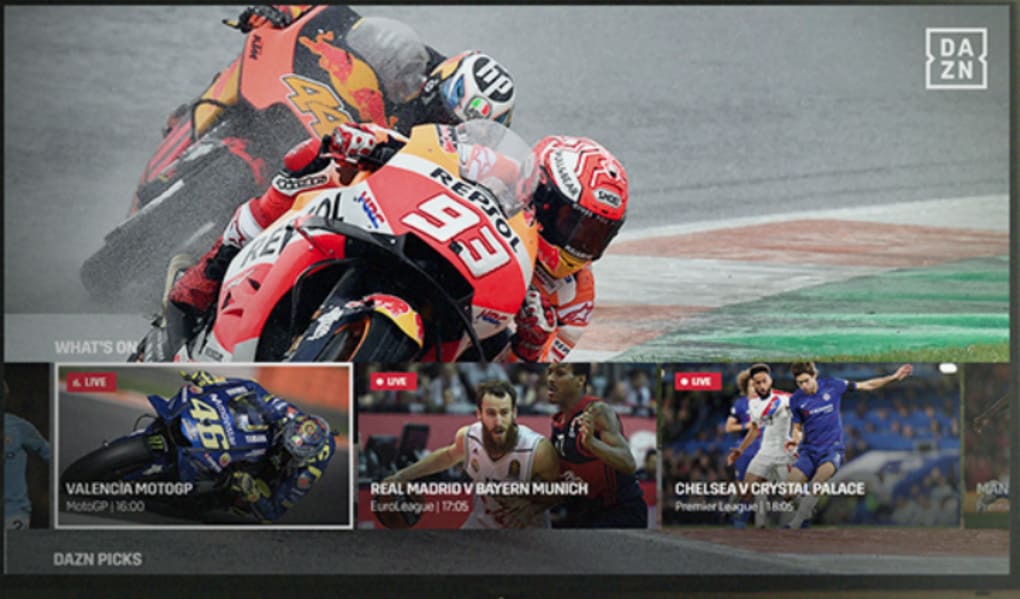
DAZN (pronounced “da‑zone”) is a subscription‑based sports‑streaming platform that has rapidly become a go‑to destination for fans of high‑octane, full‑contact events. Launched in 2016, the service has expanded its catalog to include not only MMA, boxing, and kick‑boxing but also soccer, motorsports, darts, snooker, and even niche competitions like bowling. What sets DAZN apart is its aggressive focus on live‑action delivery, offering up to 4K ultra‑HD streams, multiple camera angles, live statistics, and instant replays—all wrapped in a sleek, ad‑free interface.
New users can jump straight into the action with a free trial that requires only an email address—no credit‑card verification needed. After the trial, DAZN offers flexible monthly or annual plans, making it easy to keep the sports flowing without long‑term commitments. The platform supports simultaneous streaming on up to five devices, so families or groups of friends can watch different events at the same time without fighting over the remote. Whether you’re at home on a 55‑inch 4K TV, commuting with a smartphone, or relaxing on a tablet, DAZN delivers a consistent, high‑quality experience across Windows, macOS, Android, iOS, and most smart‑TV ecosystems.
While its catalog is impressive for combat enthusiasts, DAZN’s breadth still lags behind giants like ESPN+ or beIN SPORTS when it comes to mainstream league coverage. Nevertheless, for fans who crave a dedicated hub for fight nights, combat tournaments, and a growing selection of international sports, DAZN remains a compelling, secure, and regularly updated option.
Key Features of DAZN
- Live Combat Sports Hub: Exclusive rights to major boxing and MMA events, including title fights, regional promotions, and pay‑per‑view bouts.
- Multi‑Camera Angles & Live Stats: Switch between camera feeds, view fighter stats in real time, and enjoy on‑screen graphics that enrich the viewing experience.
- 4K Ultra‑HD Streaming: For compatible devices and internet connections, DAZN streams select events in stunning 4K resolution.
- Simultaneous Device Support: Up to five devices can stream at the same time, perfect for households with diverse sports preferences.
- On‑Demand Library: Missed a fight? Replay full matches, highlights, and condensed versions whenever you like.
- Cross‑Platform Availability: Native apps for Windows, macOS, Android, iOS, Apple TV, Roku, Amazon Fire TV, Chromecast, and most smart‑TV brands.
- Free Trial & Flexible Subscriptions: 7‑day free trial, monthly or discounted annual plans, and easy cancellation via the user dashboard.
- Secure, Ad‑Free Playback: Encrypted streams protect your data, and the platform is completely ad‑free for uninterrupted viewing.
- Regular Content Updates: Weekly schedule updates ensure you’re always aware of upcoming fights, tournaments, and special events.
Installation, Setup, and Compatibility
Getting started with DAZN is straightforward regardless of the device you prefer. Below is a step‑by‑step guide that walks you through the process from download to first‑time login.
Desktop (Windows & macOS)
- Visit the official DAZN website (www.dazn.com) and click the “Download App” button for your operating system.
- For Windows, run the .exe installer and follow the on‑screen prompts. macOS users will receive a .dmg file—open it and drag the DAZN icon into the Applications folder.
- Launch the app, create a new account or sign in with existing credentials, and select your preferred subscription plan.
- Adjust video quality settings (auto, 1080p, or 4K) in the Settings menu based on your internet speed.
Mobile (Android & iOS)
- Open Google Play Store or Apple App Store, search for “DAZN,” and tap “Install.”
- After installation, open the app, sign up or log in, and grant necessary permissions for notifications and offline storage.
- Choose your subscription, and start streaming live events or on‑demand content instantly.
Smart TV & Streaming Devices
- Navigate to the app store on your smart TV, Roku, Amazon Fire TV, or Apple TV.
- Search for “DAZN,” download, and launch the app.
- Sign in with your DAZN credentials; if you’re using a new device for the first time, you may need to verify via an email code.
Supported Operating Systems: Windows 10/11, macOS 10.14 or later, Android 6.0+, iOS 13+, tvOS, Roku OS, Fire OS, and major smart‑TV platforms (Samsung Tizen, LG webOS, Sony Android TV).
For optimal performance, DAZN recommends a minimum broadband speed of 5 Mbps for HD streams and 25 Mbps for 4K content. The app also supports HDR on compatible displays, delivering richer colors and deeper contrast during night‑time fights.
Pros, Cons, Frequently Asked Questions, and Final Verdict
Pros
- Extensive live combat sports catalog with exclusive fight rights.
- High‑quality 4K streaming and multi‑camera options for immersive viewing.
- Simultaneous streaming on up to five devices.
- Ad‑free experience and strong security protocols.
- Free trial and flexible subscription models.
- Cross‑platform support ensures you can watch anywhere.
Cons
- Limited coverage of mainstream leagues (e.g., NFL, NBA) compared to competitors.
- Geographic restrictions may block certain events in specific regions.
- 4K streaming requires a fast internet connection not available to all users.
- Occasional latency spikes during high‑traffic live events.
Frequently Asked Questions
Is there a free trial available for DAZN?
Yes. New users can enjoy a 7‑day free trial by creating an account on the DAZN website or app. No credit‑card information is required to start the trial.
Can I watch DAZN on multiple devices at the same time?
Absolutely. DAZN allows simultaneous streaming on up to five devices, making it ideal for families or groups of friends who want to watch different events concurrently.
Does DAZN offer 4K streaming?
Yes, selected live events are available in 4K Ultra‑HD. To enjoy 4K, you need a compatible device, a 4K‑capable display, and an internet connection of at least 25 Mbps.
What sports besides combat does DAZN cover?
In addition to boxing and MMA, DAZN streams soccer (including EuroCup qualifiers), motorsports (Supercross, MotoGP), darts, snooker, bowling, and occasional niche events such as e‑sports exhibitions.
How can I cancel my DAZN subscription?
Log into your account, go to the “Billing” or “Subscription” section, and click “Cancel Subscription.” You’ll continue to have access until the end of the current billing cycle.
Final Verdict & Call to Action
DAZN delivers a polished, reliable, and combat‑sport‑centric streaming experience that’s hard to match at its price point. If you live for fight nights, pay‑per‑view bouts, and want the flexibility to watch on any device, DAZN is a solid investment. Its expanding catalog of soccer, motorsports, and niche events adds extra value, though fans of mainstream American leagues may need to supplement with other services.
Ready to step into the da‑zone? Download DAZN now, start your free trial, and enjoy live action from the comfort of your home or on the go. Don’t miss the next knockout—stream it instantly with DAZN.



.png)



